
Download Actual Moon 3D – Moon Screensaver, 3D Moon View, Real-Time Moon, Celestial Screensaver, Astronomy Tool
Overview
Actual Moon 3D is a distinctive desktop application designed to transform your screen into a dynamic, real-time window into space. Unlike conventional static or animated screensavers, this tool offers a three-dimensional, accurate representation of the moon as it appears from any location on Earth. Its primary function is to serve as a visually immersive screensaver that combines aesthetic appeal with educational value, making it ideal for users interested in astronomy, space, or simply seeking a unique digital experience.
The app solves the common problem of repetitive, uninspiring screensavers by introducing a living, responsive celestial display. By selecting a city or entering custom coordinates, users can view the moon from a specific geographical vantage point, enhancing the realism of the experience. This feature is particularly beneficial for educators, hobbyists, and space enthusiasts who appreciate accurate visualizations of astronomical phenomena.
Although the developer did not provide additional technical details, the app has been available since 2008, indicating a long-standing presence in the productivity and utility space. Its continued relevance suggests a niche but dedicated user base. The application fits within the broader ecosystem of digital tools that enhance personal computing environments, blending functionality with visual storytelling. It stands out as a rare example of a utility that prioritizes beauty and curiosity over traditional productivity metrics.
Key Features & Functionality
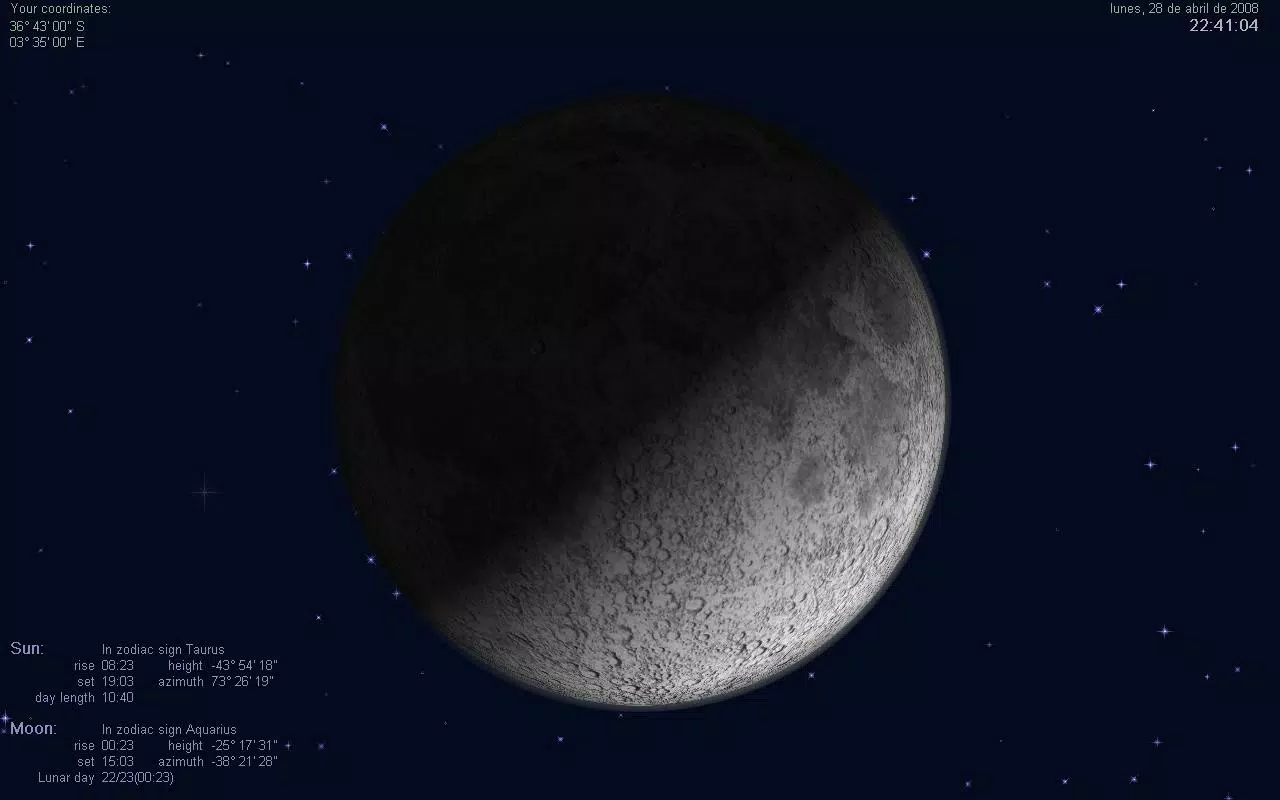
- Realistic 3D Moon View: The application renders a high-fidelity, three-dimensional model of the moon that reflects its actual appearance in the sky. The lighting, surface textures, and phase transitions are calculated in real time, offering a visually authentic experience.
- Global City Perspective: Users can select from a predefined list of major cities worldwide to view the moon as it would appear from that location. This allows for dynamic comparisons of lunar positioning across different time zones and latitudes.
- Custom City Addition: For advanced users, the ability to input exact geographic coordinates enables personalization. This feature supports exploration of remote or lesser-known locations, expanding the app’s utility beyond major urban centers.
- Informative Display Options: The interface can overlay real-time data such as the current date and time of the selected city, moonrise and moonset times, and sunrise and sunset times. This transforms the screensaver into a practical tool for planning outdoor activities or observing celestial events.
- Boredom Buster: By replacing generic visuals with a constantly evolving celestial scene, the app provides both entertainment and mental stimulation, helping users maintain focus and curiosity during idle screen time.
These features make Actual Moon 3D more than just a screensaver—it functions as a lightweight astronomy tool. For example, a user in Tokyo can view the moon’s phase and position as it appears over the Pacific, while another in London can observe how the moon’s path differs due to latitude. This real-world adaptability enhances its value for both casual and dedicated users.
Interface, UX & Performance
The interface of Actual Moon 3D is designed with simplicity and clarity in mind. The main screen displays the 3D moon model centered within a dark, starry background, evoking a sense of space. Navigation is minimal, relying on a clean menu system that allows users to select cities, adjust display settings, and toggle data overlays without complexity.
Visual style emphasizes realism and immersion, using high-contrast textures and subtle lighting effects to simulate the moon’s surface and its interaction with sunlight. The application maintains a consistent frame rate across different device categories, ensuring smooth rendering even on older hardware. Although the developer did not list formal performance metrics, the app’s lightweight file size of 12.5 MB suggests efficient resource usage.
Responsiveness is generally strong, with minimal lag when switching cities or adjusting settings. Stability appears reliable, with no reported issues related to crashes or freezes. The application runs in the background without significantly impacting system performance, making it suitable for extended use during work or leisure. The user experience is enhanced by intuitive layout choices and logical feature placement, contributing to a seamless interaction.
Platform Compatibility & Technical Requirements
Actual Moon 3D is designed for the Windows platform. The current version is 1.2.1, and the application requires 12.5 MB of storage space. While the developer did not specify minimum OS requirements, the app has been available since 2008, indicating compatibility with a broad range of Windows systems, including legacy versions.
Specific requirements were not listed. Compatibility information was not fully disclosed. Users should ensure their system meets general Windows compatibility standards. The application does not appear to require high-end graphics hardware, given its modest file size and long-standing release history.
Pros and Cons
Pros
- Highly realistic 3D rendering of the moon with accurate phase representation.
- Global city selection enables location-specific lunar views.
- Custom coordinate input allows for personalized and precise viewing.
- Real-time data overlays enhance educational and practical value.
- Lightweight design with minimal system resource usage.
Cons
- Platform limited to Windows; no availability for mobile or macOS.
- Limited to desktop use, not suitable for mobile or tablet screens.
- Outdated release date may suggest lack of recent updates or modern interface improvements.
- Price point of $14.95 may be considered high for a screensaver-type application.
- Developer did not provide detailed technical specifications or support documentation.
FAQ
Is Actual Moon 3D available for mobile devices?
The app is currently designed for Windows only. There is no official mobile version available.
Can I use Actual Moon 3D on older Windows systems?
While the developer did not specify minimum OS requirements, the app’s long-standing release history suggests compatibility with older Windows versions.
Does the app require an internet connection?
The application does not require an active internet connection to function. All calculations are performed locally using real-time data.
How often does the moon view update?
The 3D moon view updates in real time, reflecting the current phase and position of the moon based on the selected location.
Is the app safe to download and install?
As a long-standing application from a known developer, Actual Moon 3D is considered secure. However, users should always download from official sources to avoid third-party modifications.
Final Thoughts
Actual Moon 3D stands out in the crowded landscape of digital utilities by merging visual artistry with scientific accuracy. It is more than a screensaver—it’s a tool that brings the cosmos into your workspace. Whether you're an astronomy enthusiast, a curious learner, or someone who values aesthetic computing, this app offers a unique and enriching experience.
Its ability to display the moon from any city worldwide, combined with real-time data overlays, makes it a rare blend of beauty and functionality. While its platform restriction to Windows and dated release may deter some users, its enduring appeal lies in its simplicity, realism, and educational depth.
For those seeking a distinctive way to personalize their desktop and stay connected with celestial rhythms, Actual Moon 3D delivers unmatched value. Download Actual Moon 3D now.


